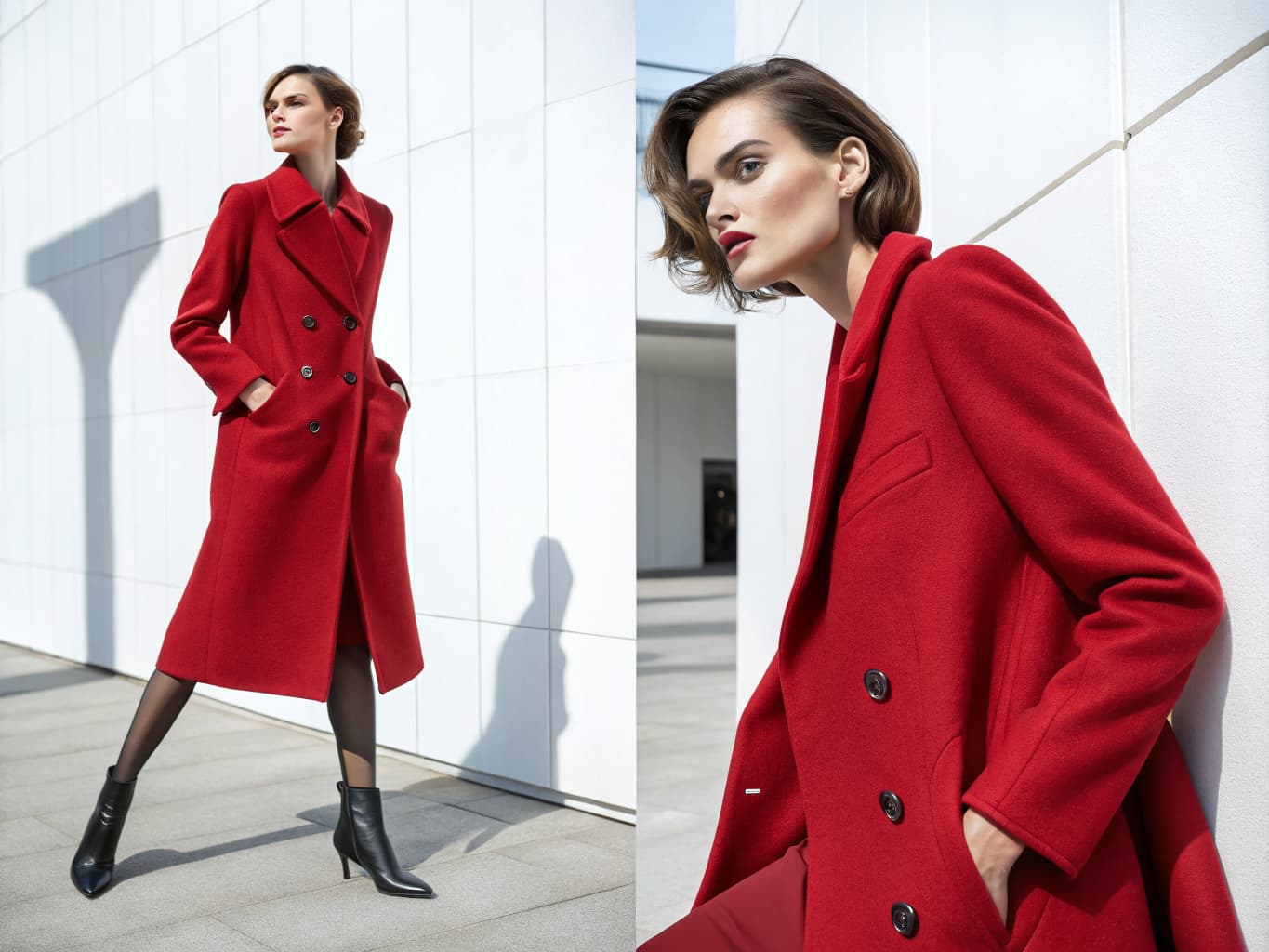
Fashion Pose Swap: 30+ Poses Without a Model Contract
Every fashion brand knows the frustration: the product looks great in some shots and mediocre in others — not because the garment changed, but because the pose didn't serve it. The fitted blazer needs confident upright posture. The flowy dress needs movement. The athletic wear needs dynamic energy.
Traditional solutions — booking multiple models, scheduling additional shoot time, or art-directing different poses during a single session — all add cost and complexity. AI pose swap changes this.
Last updated: July 15, 2026.
What is AI Pose Swap?
AI pose swap is the ability to take an existing fashion image — or generate a new one — and apply a completely different model pose while keeping the outfit, model, and styling unchanged.
The AI extracts the garment from your source image, processes the outfit's physical properties, and re-renders it on the same or a different AI model in the new pose. The result looks like a freshly photographed shot in the new pose — because, in a sense, it is.
This is a different technology than general-purpose AI inpainting, which paints new pixels into a masked region from a text prompt and has no built-in concept of a consistent body or a garment that has to drape correctly across a new joint configuration. Pose swap belongs to a specific, researched category of computer vision called pose-guided person image synthesis: given a source photo and a target pose, a model is trained to separate what the person and garment look like from what position they're in, then recombine the two under the new pose. A 2024 paper on coarse-to-fine latent diffusion addresses a common failure mode in earlier approaches — the model overfitting to the source image's appearance instead of genuinely re-rendering it under the new pose — by explicitly decoupling appearance from pose inside the diffusion pipeline (arXiv:2402.18078). A broader 2024 survey in ACM Computing Surveys traces the field's progression from earlier warping methods to today's diffusion-based approaches, and identifies holding appearance fixed while transforming pose as the field's central technical challenge (ACM DOI: 10.1145/3637060).
Why Pose Matters in Fashion Photography
Pose is one of the most powerful tools in fashion photography, yet it's one of the most variable and expensive to control.
Product images also do a disproportionate share of the persuading before a shopper reads a word of copy. In usability testing on e-commerce product pages, Baymard Institute found that exploring the product image gallery — not reading the title or description — is the first thing 56% of desktop shoppers do on a new product page (summarized by Color Experts International, drawing on Baymard's Product Details Page research). Pose is one of the main variables determining what that gallery actually communicates.
Garment silhouette: Some poses reveal a garment's structure better than others. A structured coat reads better in a standing, arms-slightly-open pose that shows the silhouette. A draped dress reads better in movement.
Brand personality: The energy of the pose carries the brand's emotional register. Upright and composed reads luxury. Relaxed and candid reads accessible and contemporary. Dynamic reads active and confident.
Platform optimization: Different platforms benefit from different poses. Square-format social posts favor tighter, centered poses. Full-page catalog spreads benefit from wider, more expansive postures.
Demographic targeting: Customers tend to respond more strongly to models whose body language matches the context in which they'll wear the product — office poses for workwear, relaxed poses for weekend wear.
The Traditional Pose Problem
With traditional photography, each pose requires:
- Physical presence of the model (scheduling and cost)
- Physical presence of the garment (logistics and sample availability)
- A photographer (equipment and day rate)
- Post-production for each new set of images
That cost is concrete, not abstract. Independent cost breakdowns of U.S. apparel shoots put a single photographer's day rate at $1,000–$3,500 in most markets ($3,000–$8,000+ in New York or Los Angeles), a model at roughly $400–$1,800 for a full day, and studio rental at $300–$2,000/day depending on tier (Wearview; Nightjar). One itemized example of a one-day shoot covering 10 outfits — photographer and equipment, model, hair and makeup, studio, and post-production — came to $2,750 all-in, or about $45 per finished image (Nightjar). That day produced a handful of images per outfit across the whole session, not multiple poses of any single garment — getting ten distinct poses of one piece in that setup would mean spending a disproportionate share of the day's limited shooting time on a single SKU.
Changing a pose after the shoot means reshooting — at full cost, day rate and all.
How AI Pose Swap Works
From Existing Images
Upload any fashion photo — either a previously generated AI image or a traditional photograph. The AI analyzes the garment in the image and prepares it for re-rendering.
From Pose Library
Select your desired pose from a curated library. Leading platforms like Alovia offer 30+ poses categorized by:
- Editorial: Classic fashion editorial stances
- Lifestyle: Natural, relaxed, candid-feeling postures
- Runway: Catwalk-inspired front-on and three-quarter walks
- Commercial: Clean, clear product-showing poses optimized for e-commerce
- Dynamic: Movement, action, energy
Custom Skeleton Upload
For complete creative control, upload your own pose skeleton — a reference that defines the exact body position, arm placement, weight distribution, and camera angle you need. This is particularly valuable for:
- Recreating specific poses from reference imagery
- Matching poses across a campaign for cohesion
- Art directing poses that aren't in the standard library
Generation
The AI re-renders the outfit in the new pose, maintaining fabric behavior, texture accuracy, and garment color consistency. Generation takes 10–30 seconds per pose.
Key Applications
E-Commerce Optimization Test different poses to find which best communicates each garment's key features and drives the strongest conversion. A/B test pose variations without reshooting.
Catalog Consistency Maintain consistent posture direction across all images in a collection — all models facing the same direction, all in comparable poses — without requiring this to be choreographed during a shoot.
Platform-Specific Content Generate multiple pose variations from the same outfit: a clean standing pose for the e-commerce listing, a more dynamic pose for Instagram, a close-cropped sitting pose for Stories.
Batch Processing Generate the same outfit in 10 different poses in a single submission — useful for testing, for detailed catalog coverage, or for generating a variety of content assets from a single garment.
Collection Variety Show the same garment in different poses across a line sheet or catalog, demonstrating versatility without requiring multiple shoot setups. An independent audit of product pages across 25 leading apparel retailers found the category average sat at 8.36 photos per product, with brands carrying many color variants running far higher — Adidas at 28.1 images, Victoria's Secret at 26.7 (Path Edits). The pattern that data captures still holds even as exact counts have shifted: brands showing a garment from more angles are the ones with the deepest galleries, not the leanest.
Pose Swap vs. Full Regeneration
| Factor | Pose Swap | Full Regeneration |
|---|---|---|
| Source requirement | Existing image | Garment upload only |
| Outfit preserved | Yes | Configure fresh |
| Model preserved | Yes (or swap) | Select new |
| Time | 10–30 seconds | 10–30 seconds |
| Cost | 10 credits | 10 credits |
| Use case | Iterate on existing look | Create new look |
Common questions about AI pose swap for fashion
Q: How does AI pose swap work for fashion photography? A: AI pose swap extracts the garment and styling information from your source image, then re-renders the outfit on the same or a new AI model in the selected pose. Fabric texture, color, and garment structure are preserved while the body position changes completely — like a photographer reshooting the same outfit in a different pose.
Q: Can I use pose swap on traditional (non-AI) photographs? A: Yes. AI pose swap works on uploaded photographs as well as AI-generated images. The AI extracts garment information from the uploaded photo and applies the new pose. Results may vary depending on image quality and garment complexity.
Q: Can I create custom poses that aren't in the library? A: Yes. Upload a custom pose skeleton (OpenPose format) to define the exact body position you need. This is particularly useful for matching specific reference imagery or creating poses that aren't covered by the standard library.
Q: How many credits does AI pose swap cost? A: On platforms like Alovia, each pose swap generation costs 10 credits — the same as a standard virtual try-on generation. A $49.99/month Starter plan provides 1,000 credits, enabling 100 pose variations.
Q: Is pose-guided AI generation peer-reviewed technology, or is it experimental? A: It's an active, peer-reviewed research area, not a novelty. Papers on pose-guided person image synthesis have been published at top computer vision venues, and a 2024 survey in ACM Computing Surveys catalogs the field's methods in depth (arXiv:2402.18078, ACM DOI: 10.1145/3637060). That doesn't mean every commercial implementation performs equally well — quality still depends on how a given product engineers the separation between appearance and pose.
Q: Does pose swap work on flat-lay or ghost-mannequin photos, or only on-model shots? A: Pose-guided person image synthesis is specifically a person-in-a-pose problem — it needs a source image of a body in a pose to remap. Flat-lay and ghost-mannequin images don't contain pose information to transfer, so an on-model source photo is required as input.
Q: What's the difference between pose swap and full regeneration? A: Pose swap starts from an existing image and preserves the outfit and model while changing only the body position; full regeneration starts from a garment upload only and lets you configure a fresh look and select a new model. Both take 10–30 seconds and cost 10 credits — pose swap is for iterating on an existing look, full regeneration is for creating a new one.
Q: What pose categories are in Alovia's 30+ pose library? A: The library is organized into five categories: Editorial (classic fashion editorial stances), Lifestyle (natural, relaxed, candid-feeling postures), Runway (catwalk-inspired front-on and three-quarter walks), Commercial (clean, clear product-showing poses optimized for e-commerce), and Dynamic (movement, action, energy).
Q: How is AI pose swap different from general-purpose AI inpainting? A: General-purpose AI inpainting paints new pixels into a masked region from a text prompt and has no built-in concept of a consistent body or how a garment should drape across a new joint configuration. Pose swap belongs to a distinct, researched category called pose-guided person image synthesis, which separates what the person and garment look like from what position they're in, then recombines the two under the new pose.
Q: How does the cost of a traditional reshoot compare to generating a pose swap? A: A single day of traditional photography covering around 10 outfits — photographer, model, hair and makeup, studio, and post-production — has been itemized at roughly $2,750 all-in, or about $45 per finished image, and that day yields only a handful of images per outfit, not multiple poses of one garment. Changing a pose after the shoot means reshooting at full day-rate cost. AI pose swap generates a new pose in 10–30 seconds for 10 credits.
Conclusion
AI pose swap gives fashion brands something they've never had before: the ability to try any pose, instantly, at any point in the production cycle — without scheduling a model, booking a studio, or coordinating a reshoot.
For brands managing large catalogs, producing content across multiple channels, or iterating on campaign direction, this capability eliminates one of the most persistent cost and timeline bottlenecks in fashion content production.
Try Alovia's Pose Swap demo — 30+ poses, instant generation, no sign-up required.
Related: AI Outfit Combination Guide · AI Virtual Try-On Guide · Try Pose Swap →
İsmail spent years building product and technology at Altın Yıldız — Turkey's benchmark for premium menswear — before founding Alovia to bring AI-powered content creation to fashion brands worldwide.
Connect on LinkedIn →