Product
Put any garment on a model in minutes
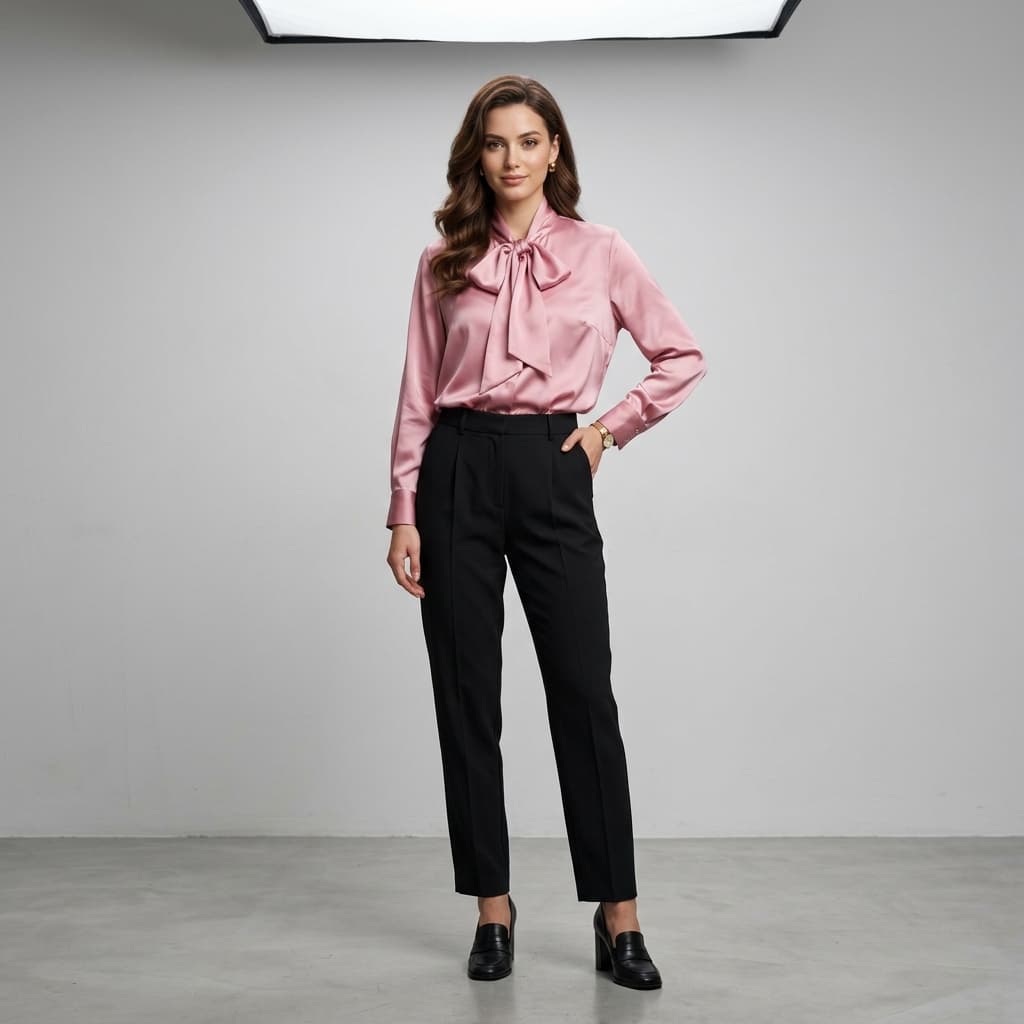
Virtual Try-On generates on-model photos of a garment from a single flat-lay photo, showing how it fits and drapes on an AI model without a physical photoshoot or sample garment. Brands use it for catalog and product-page imagery; showing customers the real fit and drape on a model can also help reduce returns.
Virtual Try-On generates on-model photos of a garment from a single flat-lay photo, showing how it fits and drapes on an AI model without a physical photoshoot or sample garment. Brands use it for catalog and product-page imagery; showing customers the real fit and drape on a model can also help reduce returns.
What can Virtual Try-On do?
No photoshoot required
Generate on-model photos from a flat lay — skip the studio, model booking, and shoot day.
Multi-garment outfits
Combine a top, bottom, footwear, and accessories in a single generation.
Native high-resolution output
Output up to 3392×5056px, generated at full resolution rather than upscaled.
Shopify export
Push generated images into your Shopify store's Files library, alt text included.
Diverse AI models
Choose from a model library spanning ethnicities and age groups, or upload your own reference model image.
From one flat lay to a studio shot
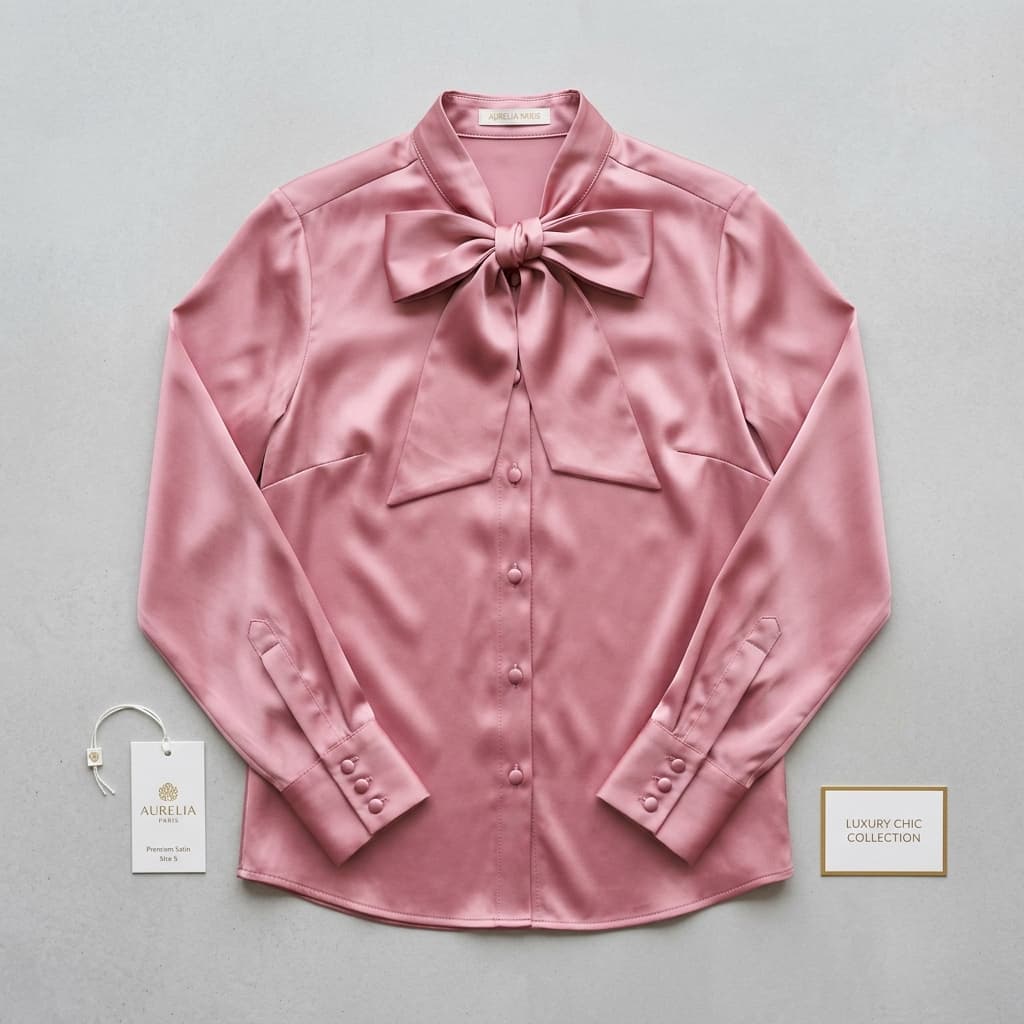
One product photo in, one on-model photo out. The blouse in both frames is the same garment file — nothing was re-shot.
How does Virtual Try-On work?
1. Upload the garment
Drop in a flat-lay or product photo, any angle or background.
2. Choose a model and pose
Pick from a range of AI models and a pose, or upload your own reference model image.
3. Generate and export
Download the studio-quality image or push it to Shopify.
Where do brands use Virtual Try-On?
Product Photos Without a Model, Mannequin, or Studio
Photograph clothes without a live model by generating on-model imagery from a flat-lay photo — no mannequin, studio booking or model casting needed.
How to Generate AI Fashion Models from Product Photos
Generate photorealistic on-model photos from a flat lay. Filter the model library by gender, ethnicity and age, or upload your own reference model.
AI Clothing Try-On Integration for Shopify Stores
Add try-on to every Shopify product page with one script tag in main-product.liquid — no app install. Shoppers upload a photo and see the fit in ~20 seconds.
How do brands rate Virtual Try-On?
“Customizing static PDF catalogs for different wholesale buyers used to take hours of manual redesign. Alovia's AI completely eliminated this bottleneck. Now, we use virtual try-on to bring basic flat lays to life and generate dynamic, targeted line sheets in seconds. If a buyer needs a different assortment for their market, I can update and share a new digital catalog instantly. It turned our most tedious manual task into a seamless, agile process.”

Thomas Bergman
Digital Visual Merchandiser
“Because I couldn't afford a professional agency, I modeled everything myself. It meant spending my entire Sunday changing outfits, adjusting tripods, and editing photos. Alovia gave me my weekends back. Now, I create stunning virtual try-on images instantly. It's incredibly cost-effective and makes my brand look like we have a massive marketing budget, without the physical toll of a DIY photoshoot.”

Ayse Aydin
Boutique Owner
Frequently asked questions about Virtual Try-On
What is AI virtual try-on and how does it work?
Virtual Try-On generates a photorealistic image of a garment on an AI model from a flat-lay photo — the garment is draped onto the model while fabric texture, color, and fit are preserved, producing a studio-quality image without a live photoshoot.
What image formats does virtual try-on accept?
JPG, PNG, and WebP up to 10MB. A clean flat-lay on a white or neutral background gives the most accurate result.
Can I combine multiple garments in one generation?
Yes — combine a top, bottom, footwear, and accessories in a single generation to preview a complete outfit on one model.
How many credits does a virtual try-on generation cost?
Each generation is priced by output resolution: 5 credits at 1K, 10 credits at 2K, and 20 credits at 4K.
Does virtual try-on help reduce product returns?
It can — showing a garment's real fit and drape on a model gives shoppers more accurate expectations than a flat-lay photo alone, and US online apparel returns ran at an estimated 19.3% in 2025, a rate imagery quality is one factor in.
Can I export virtual try-on images directly to my Shopify store?
Yes — push a generated image straight into your Shopify store's Files library with alt text included, without downloading and re-uploading it manually.
What's the maximum output resolution for virtual try-on?
Up to 3392×5056px at the 4K setting, rendered natively rather than upscaled from a smaller image. 1K and 2K are also available at a lower credit cost.
Can I generate the same garment on more than one AI model?
Yes — after a first generation, pick a different model from the library, filtered by gender, ethnicity, or age group, and regenerate the same garment without re-uploading the flat lay.
What works alongside Virtual Try-On?
AI Fashion Models
Generate realistic on-model fashion photos from a plain flat lay — pick a model and a pose, and get catalog-ready imagery in minutes. No photographer.
Catalog Generator
Turn a creative brief and flat-lay photos into a finished lookbook, campaign or B2B line sheet, exported as a PDF or a shareable flipbook link.
Combine Outfit
Composite separate flat lays of a top, bottom, footwear and accessories into one image of a complete styled outfit on a single AI model.
Ready to try Virtual Try-On?
Turn your products into buyer-ready catalogs — no photoshoot required.
Sources
- Baymard Institute — Apparel benchmark sites with no human-model image, or only one (21%). Source dated 2025-02-25.
- ProShot Media — Full-service agency product photography, per image ($100–$300+). Source dated 2025-08-28.
- National Retail Federation — US online sales returned in 2025 (19.3%). Source dated 2025-10-15.
Last updated: