Solution
Set a scene once for your collection: season, campaign theme, or custom setting, then generate every look in that world
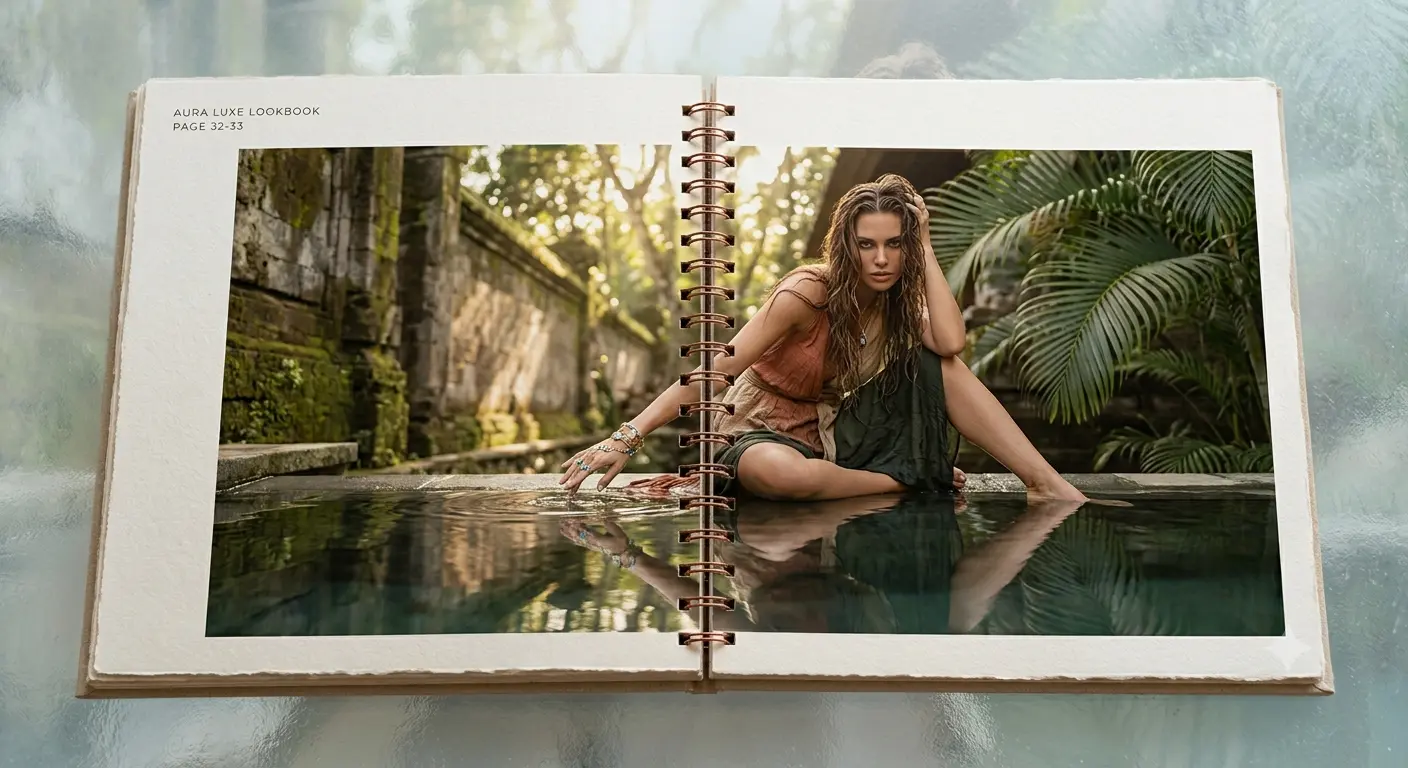
Creating lifestyle images for a clothing brand means generating on-model photos with a consistent scene, lighting, and mood across every look. Alovia's Catalog Generator (/products/catalog-generator) offers 27 seasonal atmospheres (Spring/Summer through Bridal, plus campaign themes like Holiday and Resort) and lets you customize or write your own scene description for complete creative control.
Creating lifestyle images for a clothing brand means generating on-model photos with a consistent scene, lighting, and mood across every look. Alovia's Catalog Generator (/products/catalog-generator) offers 27 seasonal atmospheres (Spring/Summer through Bridal, plus campaign themes like Holiday and Resort) and lets you customize or write your own scene description for complete creative control.
What you get when you create lifestyle images for a clothing brand with AI
What does it cost to create lifestyle images for a clothing brand with AI?
| Line item | Traditional photoshoot | With Alovia | Source |
|---|---|---|---|
| Full-service agency product photography, per image | $100–$300+ | 5–20 credits, 1K to 4K | |
| Photographer, per day | $1,500–$4,000 | Not required | |
| Model, per day | $500–$2,000 | Not required | |
| Turnaround to edited delivery | 5–10 business days | Minutes | |
| Cost per look | Billed by the day, not per look | 10 credits, about $1.00 per look | |
| What you pay monthly | Not a subscription | $49.99 Starter · $149.99 Pro |
What do you need to create lifestyle images for a clothing brand with AI?
27 built-in season + campaign atmospheres
Choose from Spring/Summer, Fall/Winter, Resort, Holiday, Bridal, and Cruise collections across 2025–2027, plus campaign themes like Black Friday and Eid Capsule — each writes a complete scene description you can edit.
Consistent setting across every look
The scene and lighting apply to every look in the campaign, which is what keeps a full collection feeling shot in one place instead of disjointed lifestyle snippets.
Fully editable scene text
Every preset description drops into a textarea as editable plain text — rewrite the mood, lighting, palette, or setting as far as you want before generating any looks.
Scene merges with brand tone
The scene (season or campaign) combines with your brand tone (luxury, streetwear, minimal, etc.) to set both the physical world and the mood each look inhabits.
Same scene, different looks
Generate a single look to test the scene, then extend it to dozens more — every look shares the same atmosphere, lighting, and palette without a reshoot.
Professional atmosphere without a set
Instead of building and lighting a physical set, describe the scene once and Alovia renders that setting and lighting into every generated on-model image.
How do you create lifestyle images for a clothing brand with AI?
1. Start a campaign and pick a season or theme
In Catalog Generator, choose either a season (Spring/Summer 2026, Resort, Holiday, etc.) or a campaign theme (Black Friday, Eid Capsule, Collaboration) — mutually exclusive by design, so your collection has one consistent setting.
2. Customize the scene if needed
The preset description generates in a text area — edit it to match your exact mood, lighting direction, palette, or environment, or leave it as is.
3. Generate every look in that scene
Upload flat-lay photos for each look and Alovia generates on-model photography for every item, all set in the same lighting, palette, and atmosphere.
What do brands who create lifestyle images for a clothing brand with AI say?
“Scaling digital campaigns across international markets used to mean juggling endless photoshoots, waiting weeks for post-production, and struggling to coordinate seasonal line sheets with our wholesale partners. With Alovia, that bottleneck is completely gone. We now generate hyper-realistic, diverse lookbook visuals and structured B2B linesheets aligned directly with our e-commerce sales calendar—all in a matter of minutes. It has eliminated the massive traditional studio expenses, slashed our time-to-market, and allowed us to deliver a seamless, high-end visual experience that keeps our digital commerce operations agile and ahead of the curve.”

Chloe Taylor
Head of Digital Commerce
“As a digital visual merchandiser, my biggest headache used to be the gap between planning a seasonal collection and actually getting the product photos ready. Waiting for physical samples to arrive so we could shoot them meant our digital lookbooks and B2B line sheets were always playing catch-up with the sales calendar. With Alovia, that timeline completely flipped. I can take basic product shots, drop them in, and instantly generate realistic, styled lookbook visuals and clean line sheets. It doesn't take away the creative control—it actually gives me the freedom to test different styling and merchandising combinations in minutes instead of waiting weeks for a studio shoot. It's cut our production costs dramatically and finally keeps our digital storefronts synchronized with our actual drops.”

Elena Sokolov
Digital Visual Merchandiser
Questions about how to create lifestyle images for a clothing brand with AI
Can I use different scenes for different looks in the same collection?
No. Scene is set once per campaign — either a season or a theme — and every look in that collection shares it. This unified setting is what keeps a full collection visually cohesive.
How many built-in season and theme presets are available?
45 total: 27 seasonal atmospheres (Spring/Summer through Bridal across 2025–2027, plus evergreen options like Capsule and Collaboration) and 18 campaign themes (Seasonal & Holidays, Retail Events, and Aesthetics & Styles categories).
Can I write my own scene instead of picking a preset?
Yes. The preset fills in a starting description in a textarea, but every field is fully editable free text — rewrite as much as you want to describe your exact environment, lighting, and mood.
What does "season mutually exclusive from campaign theme" mean?
The creative brief lets you choose either a season (Spring/Summer 2026, Resort, etc.) OR a campaign theme (Black Friday, Eid Capsule), not both in the same campaign. Switching to one clears the other, so your collection always has exactly one setting.
Does scene generation work for line sheets, or only for lookbooks?
Both. The scene picker is part of the creative brief in Catalog Generator, used for every campaign regardless of whether you eventually export a lookbook, line sheet, or catalog layout.
If I edit a preset scene, does the edit apply to future generations in that campaign?
Yes — once you edit the scene description and save it, every subsequent generation in that campaign uses your edited version, not the original preset.
How does scene generation compare to background removal or replacement tools?
Scene generation sets the backdrop and lighting at generation time — it is not a tool for removing or swapping the background of an existing photo. See Scene & Background Generation (/features/scene-background-generation) for details.
Can I save a custom scene to reuse next season?
The custom scene description you write stays in the Catalog Builder for the current campaign; to reuse it next season, copy and paste the text into the next campaign's custom scene field.
Ready to create lifestyle images for a clothing brand with AI?
Turn your products into buyer-ready catalogs — no photoshoot required.
Sources
- Baymard Institute — Apparel sites that don't show products on a human model (21%). Source dated 2026-07-28.
- ProShot Media Group — Full-service creative agency product photography, per image ($100–$300+). Source dated 2026-07-28.
Last updated: