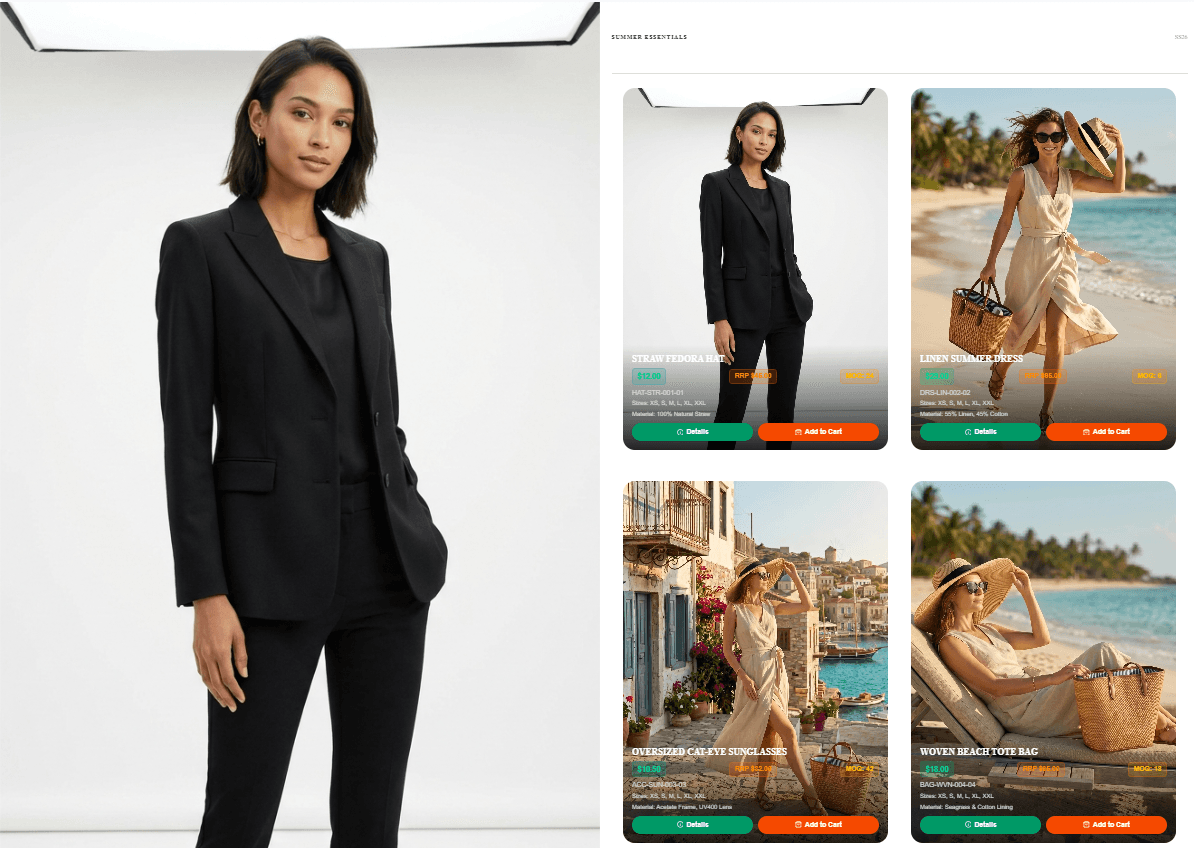
The Evolution of Wholesale: AI Shoppable Catalogs
The Evolution of Wholesale: Turning Static Line Sheets into AI-Powered Shoppable Catalogs
For decades, launching a wholesale fashion collection has followed a rigid, expensive, and frustrating sequence. Brands spend tens of thousands on campaign and product photography, spend weeks laying out assets in Adobe InDesign, and finally export massive PDF files to email to retail buyers.
This process is fundamentally broken. When a B2B buyer receives a 50-megabyte PDF attachment, they are forced into a high-friction workflow: manually writing down SKUs, checking separate inventory sheets, and emailing purchase orders back and forth.
The modern buyer expects a seamless, digital purchasing experience. The static PDF line sheet is dead. The future is the fully automated, AI-generated Shoppable B2B Catalog.
The Era of Smart Commerce: Build an AI-Powered B2B Catalog in Minutes
To solve this friction, modern fashion brands are adopting Alovia—an integrated, AI-powered platform designed to automate fashion commerce from visual creation to order collection.
We are officially in the era of Smart Commerce, where processes that used to take months are now completed in minutes. Alovia combines generative AI product photography with structured wholesale data and automated workflows. Instead of sending a static file, brands generate a secure, interactive shopping link in minutes.
Here is exactly how fashion brands are using Alovia to automate their collections from scratch:
Step 1: Set Your Brand's Creative Brief
You no longer need to coordinate expensive physical photoshoots. The automation starts by defining your brand's unique visual identity.
In the Creative Brief stage, you define your "Brand Tone" and choose a global reference model. Crucially, the "Scene Context" allows for complete creative AI control—you can enter a custom prompt like "Spring/Summer 2025 collection. Breezy light fabrics, bright clean daylight" and the AI instantly generates pixel-perfect editorial environments without a single camera click.

Step 2: Build Cross-Selling Combinations with AI
Once the creative direction is automated, you move to the Look Builder. Here, you upload your flat lays or ghost mannequin shots and the AI seamlessly blends up to 6 products into a single, hyper-realistic outfit.
This is an automated cross-selling engine for wholesale. By styling a top, bottom, and accessories together in one AI-generated lifestyle shot, you visually dictate to buyers how the collection should be merchandised. This eliminates the guesswork for retailers and directly increases your average order value (AOV).

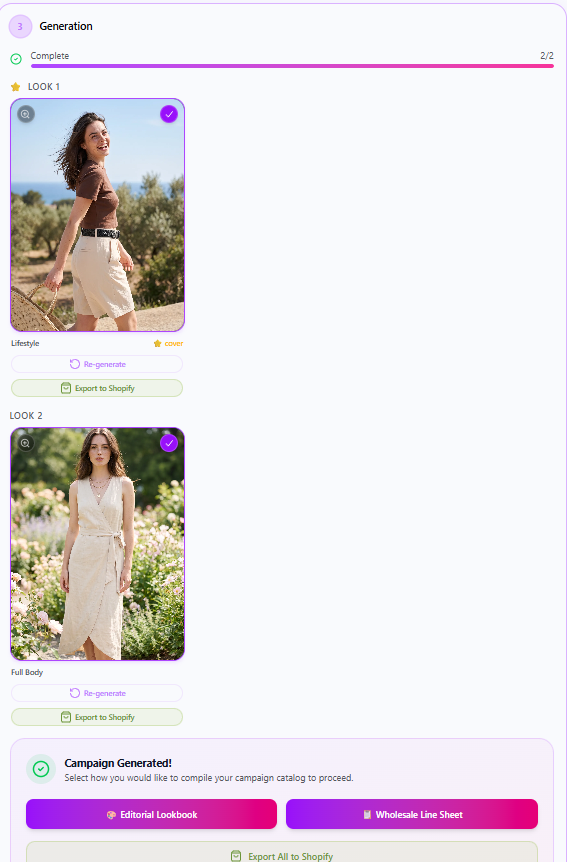
Step 3: Review AI Generation Results
After the Look Builder completes its processing, you can review the stunning AI generation results. Alovia's advanced AI engine produces high-fidelity, photorealistic lifestyle imagery that perfectly integrates your garments into the scene you defined. This step ensures that your final catalog looks like a premium, high-budget fashion editorial.
Step 4: Product Properties & Wholesale Data Entry
A beautiful AI image isn't enough for B2B sales; buyers need hard, structured data. In the Product Properties screen, you input the commercial details: SKUs, wholesale pricing, retail pricing, available sizes, and materials. This structured data is the backbone of the automation, transforming your visual flipbook into a highly functional B2B commerce tool.

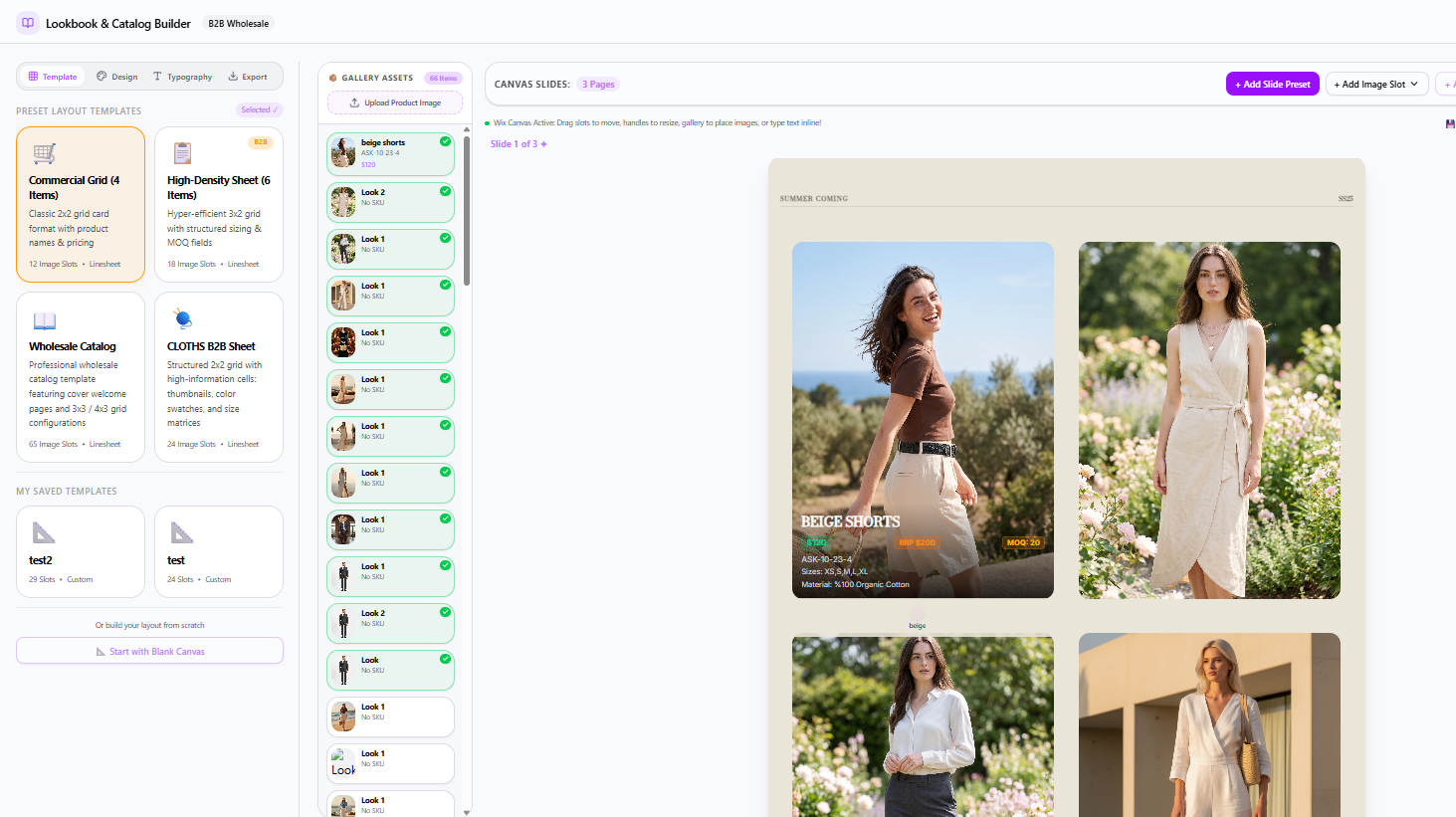
Step 5: Automated Flipbook Branding & Templates
Your catalog is an extension of your brand identity. In the Flipbook Settings interface, Alovia automates the layout presentation. You can choose from various professionally designed templates or easily create your own custom templates to perfectly match your brand's aesthetic. You simply define the Season Name, Collection Title, and integrate your custom typography and brand colors.
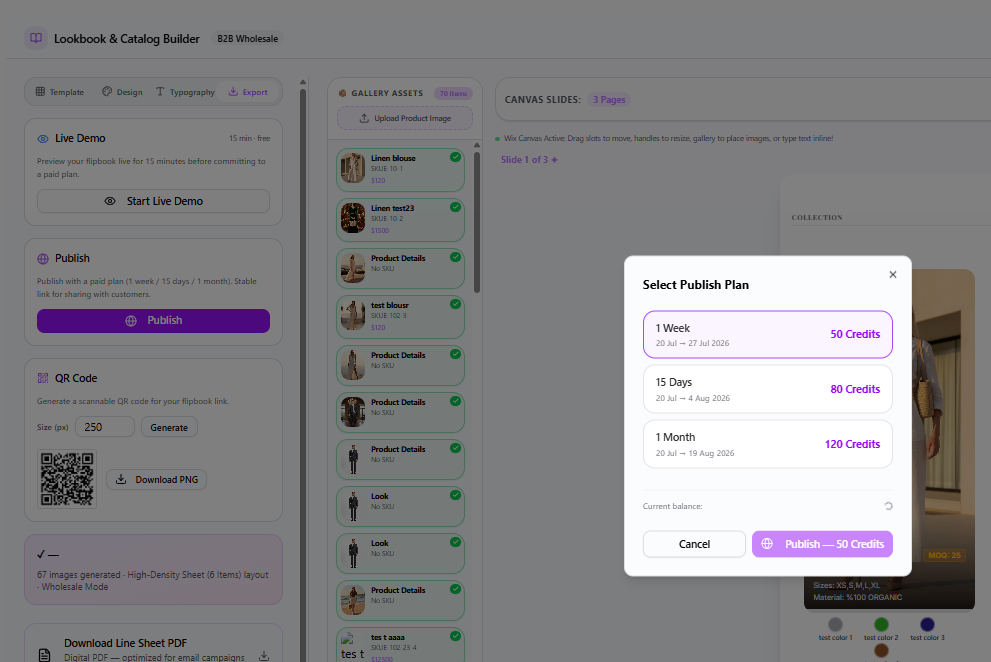
Step 6: Publish Options & Preview
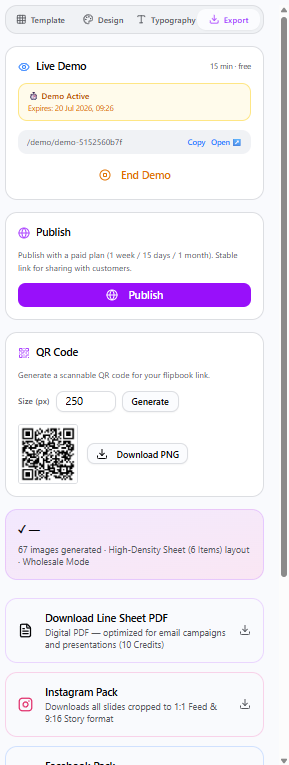
This is where Alovia completely outclasses traditional workflows. You have powerful publish options tailored for your specific needs. Before making anything live, you can book a free 15-minute demo or use the built-in preview to see exactly how your catalog will look to buyers.
Step 7: The Shoppable Experience (Add to Cart & Order Submission)
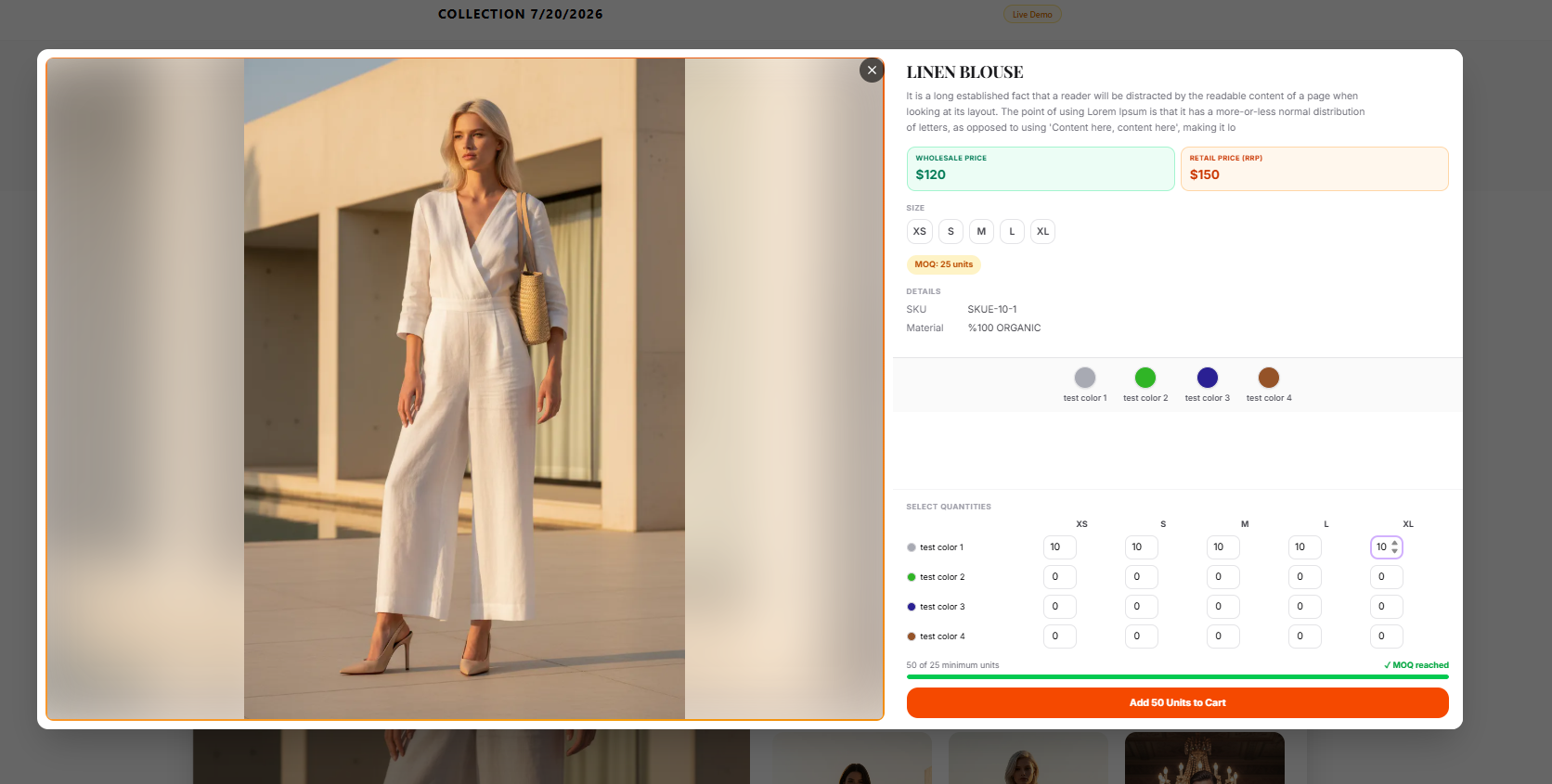
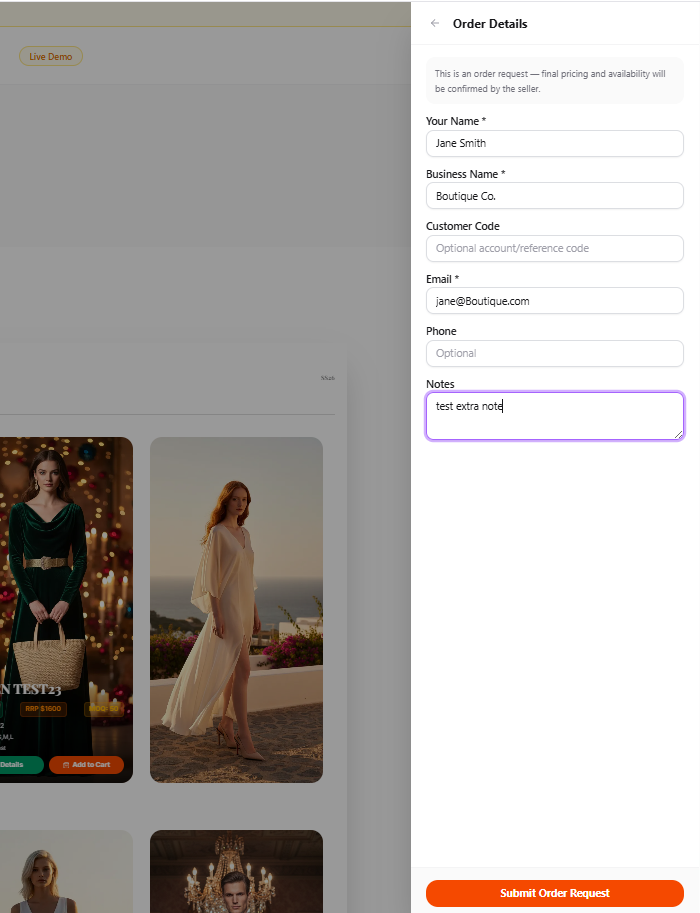
When the buyer opens your link, they don't see a static document—they experience a live, automated, shoppable digital showroom. They can view Minimum Order Quantities (MOQs), select variants, and directly Add to Cart from the flipbook interface. Once they have built their assortment, they can securely submit their purchase order. No more manual emails, no more data entry errors.
Step 8: Wholesale Order Management & Status
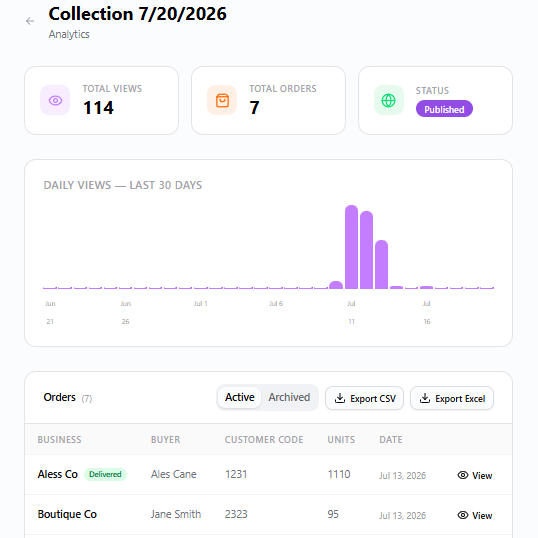
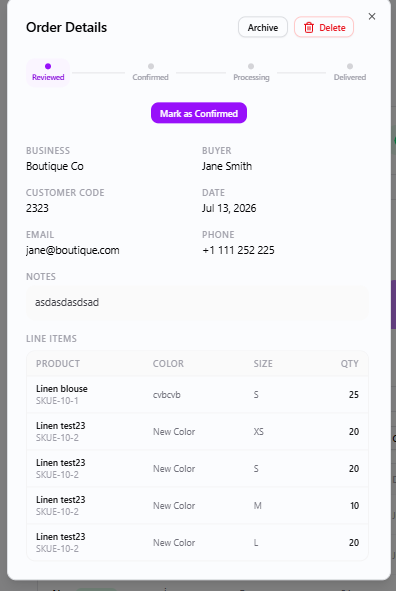
Closing the loop on wholesale automation, Alovia provides a comprehensive order management dashboard. Incoming orders are instantly listed, allowing your sales team to review, adjust, and approve them in real-time. Management can easily track order statuses, ensuring complete visibility over the wholesale pipeline.
Common questions about shoppable wholesale catalogs
Q: What is a shoppable B2B catalog? A: A shoppable B2B catalog is a live, interactive digital catalog that buyers can order directly from, replacing the static PDF line sheet that forces buyers into a high-friction workflow of manually writing down SKUs, checking separate inventory sheets, and emailing purchase orders back and forth.
Q: How do you set a brand's creative direction before generating catalog images? A: In the Creative Brief stage you define your brand's "Brand Tone" and choose a global reference model. The "Scene Context" field takes a custom prompt — for example "Spring/Summer 2025 collection. Breezy light fabrics, bright clean daylight" — and the AI generates pixel-perfect editorial environments from it, without a physical photoshoot.
Q: How many products can the Look Builder combine into one AI-generated image? A: Up to 6 products. You upload flat lays or ghost mannequin shots and the Look Builder blends them into a single hyper-realistic outfit shot, acting as an automated cross-selling engine that visually shows buyers how a top, bottom, and accessories should be merchandised together.
Q: What happens after the AI generates the look images? A: You review the AI generation results before moving on. Alovia's engine produces high-fidelity, photorealistic lifestyle imagery that integrates the garments into the scene defined in the Creative Brief, aiming for a premium, high-budget editorial look.
Q: What wholesale-specific data do you enter for each product? A: The Product Properties screen collects the commercial details buyers need: SKUs, wholesale pricing, retail pricing, available sizes, and materials. This structured data is what turns the visual flipbook into a functional B2B commerce tool, not just a lookbook.
Q: Can the catalog match my brand's own visual identity? A: Yes. The Flipbook Settings step lets you choose a professionally designed template or build a custom one, and set the Season Name, Collection Title, typography, and brand colors so the catalog reads as an extension of your brand.
Q: Can I preview the catalog before publishing it to buyers? A: Yes. The Publish Options step includes a built-in preview so you can see exactly how the catalog will look to buyers, and you can also book a free 15-minute demo before making anything live.
Q: What can a buyer actually do inside a published catalog? A: Buyers see Minimum Order Quantities (MOQs), select product variants, add items directly to their cart from the flipbook interface, and submit a purchase order — all without emailing a PDF back and forth or re-typing SKUs.
Q: What happens to an order after a buyer submits it? A: It lands in Alovia's order management dashboard, where incoming orders are listed instantly. The sales team can review, adjust, and approve orders in real time, and track order status throughout the wholesale pipeline.
Q: Does this eliminate the need for a physical product photoshoot? A: For the catalog's imagery, yes. The Creative Brief and Look Builder steps generate the editorial photography with AI, so brands no longer need to coordinate and budget for an expensive physical photoshoot to launch a collection.
Automate the Future of Fashion Sales
The transition from static PDFs to AI-powered Shoppable B2B Catalogs is a massive strategic advantage. It eliminates photography budgets, automates manual data entry, elevates your brand perception, and directly increases wholesale conversion rates.
Stop sending attachments. Start automating your sales pipeline.
Try Alovia's Automated Catalog Builder Today and transform how you sell your next collection.
İsmail spent years building product and technology at Altın Yıldız — Turkey's benchmark for premium menswear — before founding Alovia to bring AI-powered content creation to fashion brands worldwide.
Connect on LinkedIn →